Pay in installments of $5.24 with
 ,
,
 and
and

Shipping Estimate
USA
- USA
- CAN
- USA
- CAN
Ships within 48 hours · Estimated delivery Jul 28 - Aug 2
 Promo Codes Available:
For Your Every Summer RSVP, with Code: SUMMER15
Description
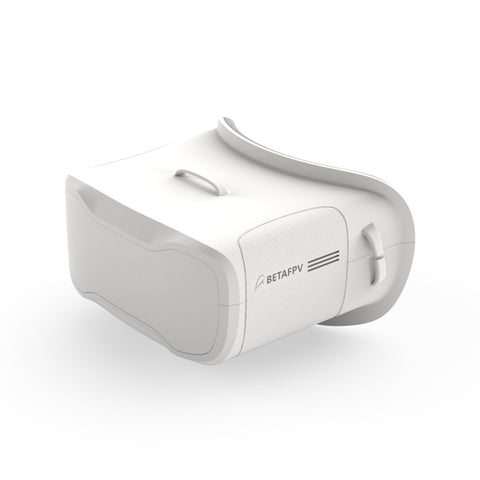
stereo fpv goggles VR02 FPV Goggles – BETAFPVVR02 FPV Goggles the First Person View Goggle with more simpler operation and powerful function, is specially designed for FPV starters. Bullet Point With the built in antennas and structure patented design, the VR02 Goggles is more compact and exquisite, less than 300g lightweight is more comfortable for wearing and carrying. VR02 goggle comes with built in 5. 8G 14DBI high quality antennas, you can receive stable and clear images even for long range
VR02 FPV Goggles - the First-Person-View Goggle with more simpler operation and powerful function, is specially designed for FPV starters.
Bullet Point
- With the built-in antennas and structure patented design, the VR02 Goggles is more compact and exquisite, less than 300g lightweight is more comfortable for wearing and carrying.
-
VR02 goggle comes with built-in 5.8G 14DBI high-quality antennas, you can receive stable and clear images even for long-range flights.
- With 4.3 inches 800*480px HD high brightness LCD, VR02 Goggles will show you a bright world without warped and blurred images, which is specially tuned for FPV racing or Model airplanes.
- Upgraded the frequency sweep function and the fast frequency auto-search function(only 2.5 seconds), pilots can easily find a band and channel with a stronger signal for a better flight experience.
- The advanced auto-searching function will show you the working frequency on the screen vividly.
- Adopt an ergonomic design with a foam sponge faceplate and a three-sided adjustable headband, this FPV Goggles fits your face and head perfectly.
|
Part |
Specification |
| BODY |
|
| SCREEN |
|
| JACK |
|
| BATTERY |
|
BETAFPV Patented Design
With the built-in antennas and the special design of the Goggles lens, the VR02 Goggles is more compact and exquisite, which makes it maintains a small and lightweight body.
Operation Instructions
| Button | Instruction |
| Power On/Off |
|
| Band+ |
|
| Search |
|
| CH+ |
|
Band and Channel Selection
|
CH
|
CH 1
(MHZ)
|
CH 2
(MHZ)
|
CH 3
(MHZ)
|
CH 4
(MHZ)
|
CH 5
(MHZ)
|
CH 6
(MHZ)
|
CH 7
(MHZ)
|
CH 8
(MHZ)
|
|
GROUP
|
||||||||
|
A
|
5865
|
5845
|
5825
|
5805
|
5785
|
5765
|
5745
|
5725
|
|
B
|
5733
|
5752
|
5771
|
5790
|
5809
|
5828
|
5847
|
5866
|
|
E
|
5705
|
5685
|
5665
|
5645
|
5885
|
5905
|
5925
|
5945
|
|
F
|
5740
|
5760
|
5780
|
5800
|
5820
|
5840
|
5860
|
5880
|
|
R
|
5658
|
5695
|
5732
|
5769
|
5806
|
5843
|
5880
|
5917
|
| L | 5362 | 5399 | 5436 | 5473 | 5510 | 5547 | 5584 | 5621 |
- BETAFPV VR02 FPV Goggles has a frequency sweep function and a fast frequency auto-search function, it will help pilots find a stronger Band to get a better flight experience.
- The frequency sweep function can display the occupancy status of each channel in the current space so that pilots can fly with a better Band and enhance the flight experience.
How to use the frequency sweep function?
After powering on, short press the "S" button to enter the sweeping interface, as shown below. Pilots can change the Band via the "Band+" and "Ch+" buttons.
Band Status Indicator
| Green | 0<RSSI<20, not occupied |
| Yellow | 20<RSSI<70, there is a drone occupying the Band far away, or there is interference |
| Red | 70<RSSI<99, occupied |
| White | current Band (highest RSSI in the sweep result) |
How to use the fast frequency search function?
After powering on, press and hold the "S" button for 1 second to start the frequency auto-search. The frequency auto-search process is 2.5 seconds. After the frequency auto-search is over, it will beep twice and jump to the corresponding Band of the drone.Package
- 1 * BETAFPV VR02 FPV Goggles
- 1 * Adjustable Headband
Shipping Notes
- Free Standard Shipping on $100+ Orders to the USA.
- Except Preorder products are shipped in 48 hours.
- Delivery to the USA:
- Standard Shipping : 3-10 business days
- If time is of the essence, please consider selecting expedited delivery for faster service.
Exchange/Return Notes
- We offer a 30-day return/exchange service after receiving.
- Final sale items are not eligible for returns or exchanges.
- To process your return/exchange, please contact us at [email protected]
- Please click here for more details>>> Return & Exchange Policy